Notes on self-hosting forgejo, runners and git-pages with CapRover

Before I start to talk about the actual hosting part, I need to explain a bit of context and the choices I made. It all started a few months ago, when GitHub sent me an email I've been dreading for a while:

This email marks the end of me being a computer science student, and forces me to come to terms with the fact that I am supposed to be a responsible adult and should therefore pay for my GitHub Pro status. All that to enjoy the brand new AI features.
But sadly for Microsoft, I don't want to use any of their AI powered features, nor do I want to have my data used for their training. I also grew really fond of not sharing all my data with american-based companies, yay for EU-sovereignty!
Lucky for me, I already own a few VPS from my favorite hosting provider, PulseHeberg. The servers are based in France, specifically Paris and Marseille, and I already have them up and running some stuff using CapRover (this blog runs on one of them!).
And so here we are a few months later, after a refreshing summer vacation in southern France and having the company I work at being bought by another company and subsequently being fired due to not having enough experience, it is now the time to decide which software I'll use to replace GitHub. And as it turns out, there is actually a surprising amount of choice in this space.
Why Forgejo and not something else?
I've been personally using GitHub for like 10 years, have used GitLab intermittently at my different workplaces in recent years, and had already looked into Gitea for self-hosting back in late 2022 when I moved away from X (Twitter) into my own self-hosted Mastodon instance (Actually a fork of Misskey called Firefish).
I already have an idea of what I'll use this server for, and thus have the following constraints:
- Must have CI/CD runners
- Must be lightweight enough to run on 4vCPU and 4Gb of RAM alongside all my other services without hogging all the resources
- Must have static page deployments (à la github pages)
- Must be able to create private repositories
At first, my mind went directly to GitLab because it's the alternative I'm most used to, and which is also directly available as a CapRover One-Click Apps. But as it turns out, GitLab is slightly too heavy for my hardware. If I had only GitLab on the VPS, it might've worked out.
I then thought about Tangled, since I am quite a fan of ATProto and have been following the project for quite a while now. But sadly for me, Tangled still does not support private repositories, even if you host your own knot. I'm still keeping an eye on the project, and I'm still very open to migrating everything to it the day they finally solve private data on ATProto.
Meanwhile, I had stopped looking at what was happening with Gitea for a few years since my first experience with it. It turns out that a lot of things happened, and now Forgejo exists. And by chance, it meets all my requirements. So after trying it out a bit on Codeberg and reading some docs, my choice was made and I started working on setting it up.
Running Forgejo on CapRover
Running Forgejo should be an extremely easy task to do on CapRover, especially since CapRover already has a community maintained One-Click App template for a Gitea server.
Thanks to CapRover's Template One-Click App, I can take the time to work on my own scripts, and worry about deploying them correctly later down the road. I proceeded to write the forgejo and forgejo-runner apps through trial and error on a separate caprover server with no concerns for potential data loss or configuration mishaps.
The forgejo app itself has nothing really interesting going on with it. It's basically a copy paste of the Gitea One-Click App, but with PostgreSQL instead. We can run this directly without any other dependencies, provided your DNS are already configured to point to your domain, and voilà! Your code forge is now ready to go. You just need to access it right after this, finish its setup by creating the admin account and defining whatever other env variables you might need. You can always add/remove variables from the App Configs in CapRover and simply restart the app to apply the changes.
The actual forgejo.yml file is available here for the curious.
The forgejo-runner on the other hand comes with some other concerns, especially security concerns. Mainly the part where I mount the Docker socket to the container itself, essentially giving root access to the container and anything running in it. This is absolutely NOT ideal, and there are ways to prevent this, using DinD, LXC, a socket proxy or even by simply using Podman. All of this is discussed thoroughly in the Forgejo Actions documentation if you want to learn more about these concerns and how to mitigate them. On my hand, I do not plan on giving access to my code forge to any other contributors yet, and if I do, it'll only be people I completely trust.
You can find the yaml file for the runner app here.
And before we can start the forgejo runners and configure them, we need the setup of forgejo itself to be completed. It's mandatory to register the runners on Forgejo before creating them as apps, since they require a random UUID and Token given by Forgejo in order to register them properly with your instance.
Once you've registered your runner (one or more), you will see them appear as "Idle" in the environment you registered them in, meaning they are actually working and communicating back with your forge. Neat!

Testing the runner
I recently started doing the 20 games challenge in order to learn the Godot Engine a bit more. This means I already have a few Godot projects that I can use to test an actual CI workflow. I'll simply use the smallest project I've done for convenience there.
I created a simple forgejo workflow called godot-ci, which is based off the godot-ci repository and docker image. Unlike the One-Click-Apps, I don't plan on releasing my 20 games challenge to the public, so you'll have to make do with the following script only:
name: "godot-ci export"
on: push

env:
    GODOT_VERSION: 4.7.2
    EXPORT_NAME: Pong
    PROJECT_PATH: .

jobs:
    export-windows:
        name: Windows Export
        runs-on: ubuntu-latest
        container:
            image: barichello/godot-ci:4.7.2
        steps:
            - name: Checkout
              uses: actions/checkout@v6
              with:
                  lfs: true
            - name: Setup
              run: |
                  mkdir -v -p ~/.local/share/godot/export_templates/
            - name: Windows Build
              run: |
                  mkdir -v -p build/windows
                  EXPORT_DIR="$(readlink -f build)"
                  cd $PROJECT_PATH
                  godot --headless --verbose --export-release "Windows Desktop" "$EXPORT_DIR/windows/$EXPORT_NAME.exe"
            - name: Upload Artifact
              uses: https://code.forgejo.org/forgejo/upload-artifact@v4
              with:
                  name: windows
                  path: build/windows

    export-linux:
        name: Linux Export
        runs-on: ubuntu-latest
        container:
            image: barichello/godot-ci:4.7.2
        steps:
            - name: Checkout
              uses: actions/checkout@v6
              with:
                  lfs: true
            - name: Setup
              run: |
                  mkdir -v -p ~/.local/share/godot/export_templates/
            - name: Linux Build
              run: |
                  mkdir -v -p build/linux
                  EXPORT_DIR="$(readlink -f build)"
                  cd $PROJECT_PATH
                  godot --headless --verbose --export-release "Linux" "$EXPORT_DIR/linux/$EXPORT_NAME.x86_64"
            - name: Upload Artifact
              uses: https://code.forgejo.org/forgejo/upload-artifact@v4
              with:
                  name: linux
                  path: build/linux
making it so that whenever I push code to the main branch, the workflow gets executed and asks godot to build my game for both Windows and Linux, according to my export preferences defined in the project.
So, to test it out, I try pushing some changes to the main branch of the repository:
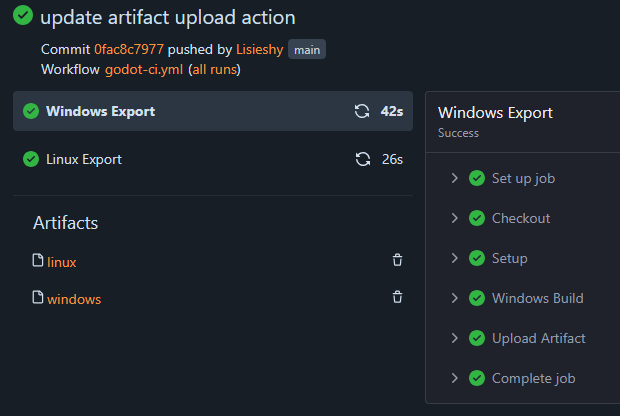
And it seems to be working fine! My build artifacts are available to download, CI ran quite fast too which is pretty cool considering everything runs on the same host with not that much CPU or RAM.
Everything is going great, I've got 75% of all the features I want to have, so let's finish the last 25% and be done with this whole thing!
git-pages
Thankfully, while looking through Codeberg in order to get a feel for Forgejo, I stumbled upon the Codeberg Pages setup, and the git-pages repository. So, just like Forgejo and the runners, I started writing the One-Click Apps template for it. And with everything being very easy to setup, I went into this thinking it'll be a 20 minute adventure just like the other parts of this setup.
It was not.
While writing the One-Click Apps script for git-pages, my starting place was the documentation of git-pages. Reading through it, I looked through the example configurations, how to deploy guides with Docker compose, and slowly worked my way through a valid yaml app for CapRover. One neat thing many software like these do is the ability to give configuration through multiple means. For example, the Forgejo image allows you to pass in environment variables in order to define about everything. Same goes for the Forgejo-runner image (with a huge caveat about the Docker socket that led me to use some questionable things in it, sorry). So, seeing that the git-pages image was similar, I decided to do it through environment variables too instead of a config file. Doing it this way makes it way easier for other users of the One-Click App to customize their own stuff, since you can do it all through CapRover's UI without needing to go edit a file on the host server. Win-win!
So, continuing to write the configs, I notice that some of the very important variables that need to be defined are in the [[wildcard]] section of the config.toml file. For the untrained eye, you might not realize the issue here, but this wildcard is actually an array. This means you cannot actually map these variables directly to the corresponding environment variables in the format described in the documentation.
My first reflex when I realized it was actually asking for an array was to simply feed it a raw JSON object with all the inner variables within. But no matter what I tried, the Go parser wouldn't allow me to. It always failed at the clone-url line, saying the variable couldn't be mapped. As it turns out, you need the internal variable names of the struct, and not the ones that were used in the config file. So the clone-url actually had to become, you guessed it, CloneURL. Urgh. I guess that's on me for not using the mainly supported way to config the thing. But now, everything works, git-pages successfully starts, and the yaml file is available here.
In the end, my PAGES_WILDCARD environment variable is defined with the following: [{"Domain":"pages.catgirl.fr","CloneURL":"https://git.catgirl.fr//.git","IndexRepo":"pages","IndexRepoBranch":"pages","Authorization":"forgejo"}]
I want my pages to be hosted on the <user>.pages.catgirl.fr domain, so I defined the wildcard to be at pages.catgirl.fr, went into my registrar and added the wildcard redirection to my CapRover IP. I then proceeded to the git-pages app in my CapRover dashboard, typed *.pages.catgirl.fr in the Connect New Domain field and hit confi- what's that? Oh no. Oh no no no.

As I now came to realize, CapRover does not support wildcard domains. Uh oh.
Reading through some GitHub issues and comments online, it turns out this is not really due to CapRover itself, but due to other constraints that I don't really understand fully, as I've read most of this stuff way past my bedtime. I was in way too deep.
But before diving into the SSL, I quickly edited the default nginx configuration for git-pages in my CapRover dashboard, replaced all the server_name <%-s.publicDomain%>; with a very similar server_name <%-s.publicDomain%> *.<%-s.publicDomain%>; in order to redirect all pages subdomain traffic to the git-pages container, even if it was only HTTP yet, traffic was flowing correctly.
So I created an empty repo called pages with a single index.html file in it, took the example forgejo workflow used to deploy a website, used it as a reference point, read some Forgejo Actions documentation, and ended up with the following script:
name: Publish
on: push
jobs:
    publish:
        runs-on: docker
        steps:
            - uses: actions/checkout@v7
            - run: |
                  mkdir _site
                  cp *.html _site/
            - if: ${{ forgejo.event_name == 'push' && forgejo.event.ref == 'refs/heads/main' }}
              uses: actions/git-pages@v2
              with:
                  site: http://${{ forgejo.repository_owner }}.pages.catgirl.fr/
                  token: ${{ forgejo.token }}
                  source: _site/
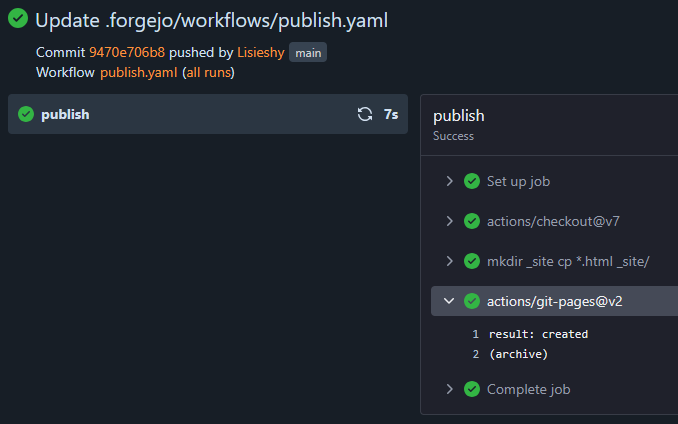
Pushed everything, and watched the Forgejo actions actually run and deploy my site! Yay! But only through http. Nay! But alas, now I only need a wildcard SSL certificate to be done!
Somehow, it's always DNS
I went deep into this wildcard SSL certificate. Way too deep. I wanted this to work so bad I actually cancelled plans in order to keep thinking of solutions that would work.
CapRover uses Certbot inside the box, and Certbot uses Let's Encrypt. Let's Encrypt's official documentation about challenges says that the ONLY way to obtain a wildcard certificate is through a DNS-01 challenge. To simplify, this challenge requires an API access to the DNS Zone of a domain to prove ownership of it by adding specific TXT records for the ACME challenge. Certbot supports said challenges with the use of custom plugins depending on your registrar, and CapRover allows us to override its default Certbot configuration (which uses HTTP-01 challenge, that only requires ownership of the /.well-known/acme-challenge/ path of any given domain).
So, remember how I talked about my favorite hosting provider, PulseHeberg? It turns out I also own most of my domains through their registrar service too. Neat, I can do everything in one place, so this'll be easy!
I started to look through the community made Certbot plugins for each registrar... and searched some more... and more... but never found one for PulseHeberg. Weird, I thought.
I figure I'll just use a standard generic plugin and hand wire the APIs myself, so I proceed to look through PulseHeberg's documentation to find anything about such an API.
Nothing.
I decide to open a support ticket with them in order to ask them about it, and they answered in less than 5 minutes, so kudos to that! Sadly for me, it wasn't a good answer. TL;DR, no, they don't have an API for DNS-01 support, but they recommended me to either use Cloudflare as a DNS Zone specifically for that subdomain and route traffic through that, since Cloudflare has a Certbot plugin for the DNS-01 challenge, or to wait for the DNS-PERSIST-01 challenge to be deployed by Let's Encrypt.
I'm leaving GitHub and needing to create a Cloudflare account really doesn't sit well with me, so I won't be doing that.
This makes it so that my only option is to wait for the new challenge type to be deployed by Let's Encrypt. Should be in a few months, maybe more, maybe less.
I was now out of options and for once it wasn't 4am. So I talked about the issue with some friends over on discord, and I then realized how stupid I actually was.
Remember how I said I don't plan on having other people on this code forge? Why don't I just, you know, add only the 2 or 3 subdomains I'll use for the pages, which are not wildcard, and then let CapRover request these certificates individually?
So yeah. That's what I did.
Updated the publish script to use https instead of http
name: Publish
on: push
jobs:
    publish:
        runs-on: docker
        steps:
            - uses: actions/checkout@v7
            - run: |
                  mkdir _site
                  cp *.html _site/
            - if: ${{ forgejo.event_name == 'push' && forgejo.event.ref == 'refs/heads/main' }}
              uses: actions/git-pages@v2
              with:
                  site: https://${{ forgejo.repository_owner }}.pages.catgirl.fr/
                  token: ${{ forgejo.token }}
                  source: _site/
Tried it out on my Lisieshy/pages, commited the change, saw the workflow start automatically, and succeed on the first try.
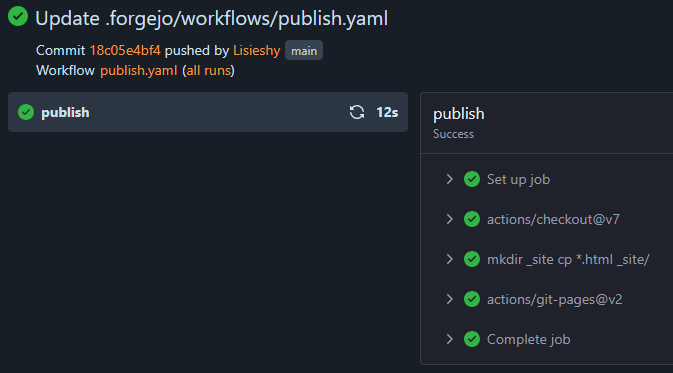
Finally, after almost a complete week of debugging stuff sometime until 5A.M, I finally have it. My own GitHub Pages, with SSL et al.
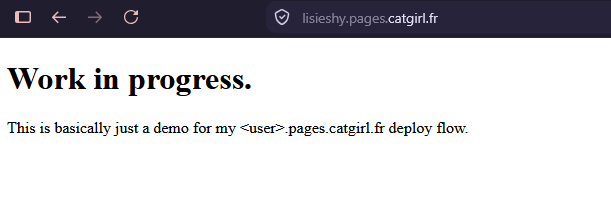
One day I'll have the motivation to write actual content on this page, but after all that, I think I'm done for the month.
